
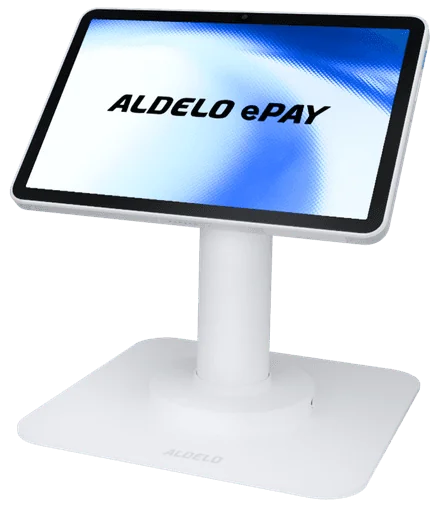
T2Aldelo ePay Terminal
T2 brings Aldelo Express POS and native integrated EMV chip and tap payments into one Android terminal. Dock at the counter or detach the tablet to serve nearby.
ALDELO EPAY PAYMENT GATEWAY
Aldelo ePay is certified for U.S. credit and debit processing through Fiserv. Connect restaurant checkout with Aldelo Pay merchant services or another compatible merchant account.
 THE LAST MOMENT MATTERS, TOO
SEE IT IN ACTION
From counter orders on T2 to tableside service and payment with P5L. See how Aldelo Express connects your team around the guest.
Choose a counter terminal, a handheld, or both. Bring ordering and payment together wherever you serve.
T2 brings Aldelo Express POS and native integrated EMV chip and tap payments into one Android terminal. Dock at the counter or detach the tablet to serve nearby.
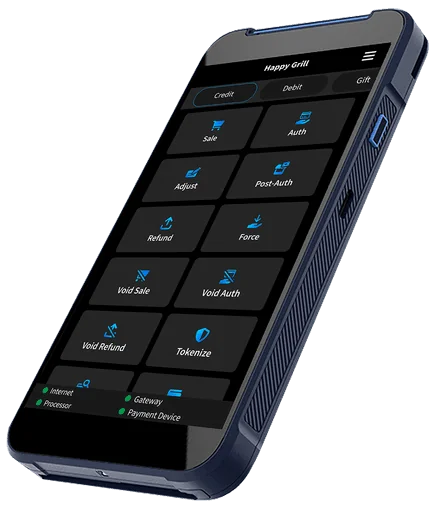
P5L brings Aldelo Express POS and native integrated EMV chip and tap payments into one Android handheld. Take it tableside, to the curb or into mobile service.
ONE CONNECTED PAYMENT FLOW
A payment gateway connects your checkout to the processor that handles your merchant account. Aldelo ePay brings that connection into your restaurant’s daily service.
Use it with Aldelo Express for integrated ordering and payment, or as a standalone payment solution on a supported device.
See integrated checkoutBUILT FOR THE WHOLE SHIFT
With Aldelo Express integration, the ticket and payment stay in one workflow. Reduce the extra steps of a separate checkout.
Accept credit and debit cards, EMV chip and contactless payments on supported devices, including compatible mobile wallets.
Connect payment acceptance with Online Order so guests can order and pay through your restaurant’s digital storefront.
Transaction tracking and reporting help your team review payment activity and reconcile the day’s business.
ePay uses encryption and tokenization to help protect payment data as transactions move through the checkout flow.
Store & Forward supports T2, P5L, PAX A920Pro and PAX A35. Set transaction limits at your store and submit held payments after connectivity returns. Authorization is not guaranteed.
Explore offline payment redundancyPayment methods and features depend on the device, processor, merchant account and configuration.
YOUR PROCESSOR OPTIONS
Aldelo ePay currently supports Fiserv for U.S. credit and debit processing. Aldelo Pay is an optional merchant-services provider. If you have an existing account, confirm its compatibility and device setup before making a change.
Check my processorGET STARTED WITH EPAY
Tell us where guests pay: at the counter, tableside, on the go or online. Match ePay devices and services to those moments.
Use a compatible Fiserv merchant account or explore Aldelo Pay. Confirm account access, equipment and the complete written offer before activation.
Online training and support are included. Self-install or arrange paid partner installation, then practice payments, tips, receipts and reconciliation before opening.
CASH DISCOUNT WITH ALDELO EXPRESS
Offer a discount from your regular price when guests pay with cash. Aldelo Express applies your configured cash discount at checkout and can show the cash total on the guest check.
Ask about cash discountReview menu prices and choose the discount that fits your restaurant.
Show the cash total on the guest check so guests can understand their choice.
Explain the program clearly before guests order and pay.
Cash discount differs from a card surcharge. Confirm the program, pricing, receipt and signage requirements for your restaurant before enabling it.
GET ALDELO EPAY
Download Aldelo ePay, start merchant-account setup and bring payments to your counter or service floor.


Payment acceptance requires an approved merchant account and a supported payment setup.
Questions before you start?BRING THESE QUESTIONS
Is my processor, merchant account and device combination supported?
What gateway, processing, device and service fees are included?
How are funding, chargebacks, and account support handled?
What current-provider obligations should I check before switching?
Get my proposalRelated to this page
These suggestions match this page and any preferences you selected.
Recommendation preferences stay in this tab for the current visit. Reset clears them; hiding this section leaves other website features available.
LET’S MAKE IT WORK FOR YOU
Tell us about your processor, checkout needs or device questions. We’ll help you review the supported options.