Browse with images
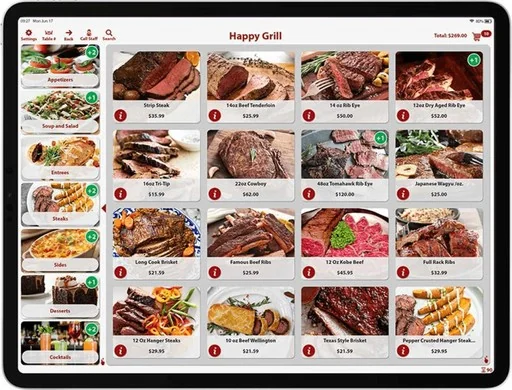
A visual touchscreen menu helps guests find items and choose their options.
FOR GUESTS WHO WANT TO ORDER DIRECTLY
Aldelo Self-Service Kiosk
Guests browse your menu, choose their options and pay on an iPad connected to Aldelo Express.
SEE IT IN ACTION
Follow the guest-facing self-service ordering experience.
BUILT AROUND THE WORK
A visual touchscreen menu helps guests find items and choose their options.
Multilingual menus and ordering support a wider range of guests.
Self-order and self-pay bring a guest-led option to counters, tables and lobbies.
Orders flow into Aldelo Express and the configured kitchen screens or printers.
SEE THE PRODUCT
Explore the tools around each part of service. Available options depend on your setup.
Image-based item browsing gives guests a visual starting point for their order.
FOLLOW THE TASK
Show guests a menu with item images and choices. Review how your modifiers and available languages should appear.
Discuss the supported ordering and payment setup at a walk-up station or a tableside device.
Test how staff receive the order and identify the pickup point, table, or seat for the handoff.
YOUR NEXT STEP
Choose the kiosk location, guest-help process and fulfillment handoff before preparing the visual menu.
Walk through a first-time guest’s complete order, including how to get help.
Use menu photos across POS, kiosk and online ordering Training & tutorials Product supportRelated to this page
These suggestions match this page and any preferences you selected.
Recommendation preferences stay in this tab for the current visit. Reset clears them; hiding this section leaves other website features available.
LET’S MAKE IT WORK FOR YOU
Tell us which workflow you want to see. We’ll help arrange a focused product demonstration.